

Rollaxis™ Research & Education Edition
Movement analysis from video and photographs for teaching, learning and research. Walking · running · squat · posture · Landing Error Scoring System.
Version DV · Windows desktop application · works offline
Five analyses, one software
- Posture from photographs
- Walking gait – all eight phases
- Running – contact, mid stance and push-off
- Squat – depth, knee and trunk control
- Landing (LESS) – jump-landing errors scored
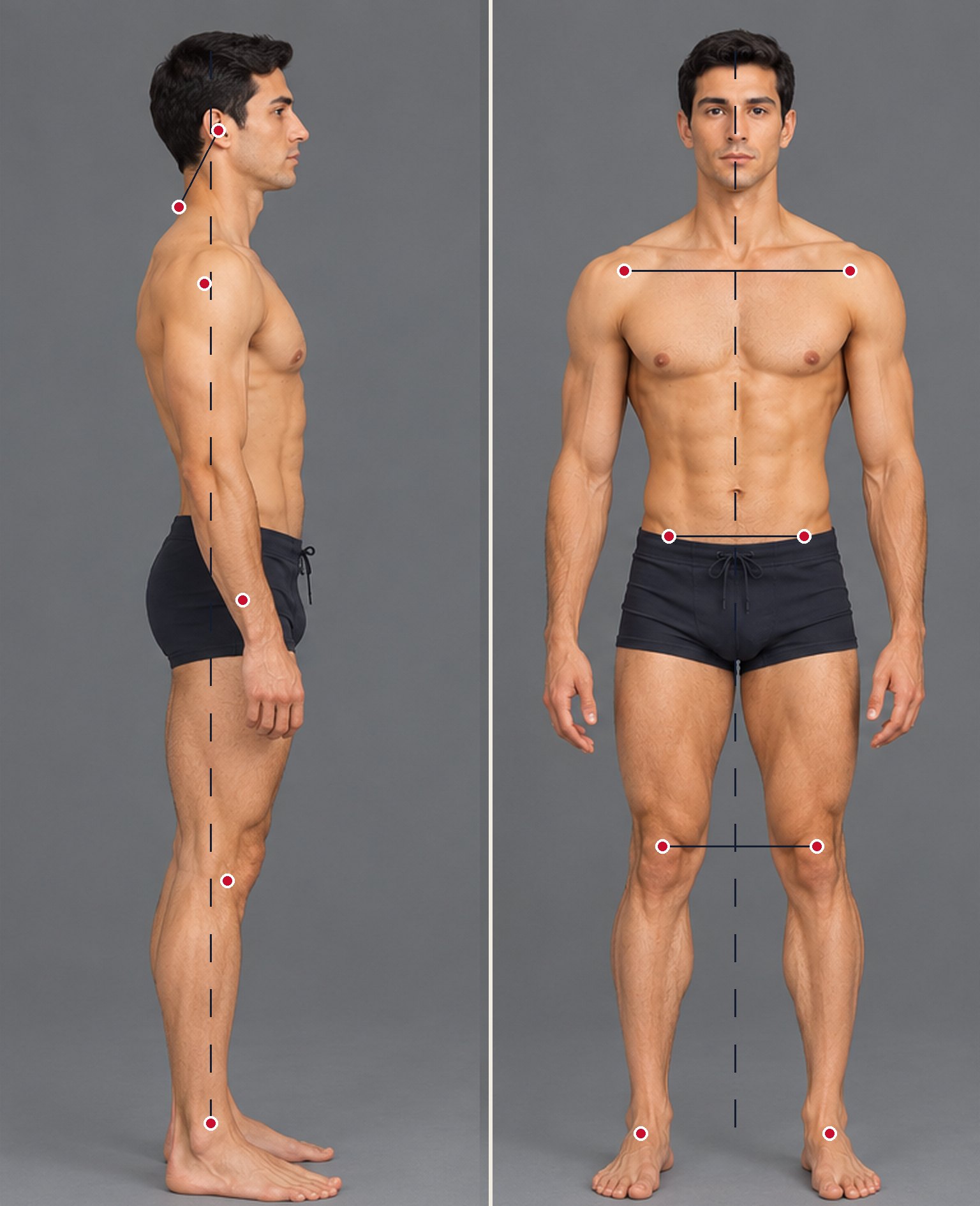
See every landmark, measure every angle
Students learn to observe movement by eye. Rollaxis turns that into numbers they can check, compare and discuss.
- Auto-detect markers for speed, or place each one by hand so students learn every landmark
- Every measure shown against a published normal range, with the source listed
- Teaching interpretation for class discussion
- An informed-consent step aligned with the DPDP Act, 2023
- Works offline; participant data stays on the laptop
What Rollaxis measures
Each analysis opens the right number of cameras automatically and offers recommended camera settings.
Walking
All 8 Rancho Los Amigos sub-phases on both sides, plus mid stance from front and rear. Hip, knee and ankle angles, pelvic drop, rear-foot angle, patella vs 2nd toe, stance/swing %.
Running
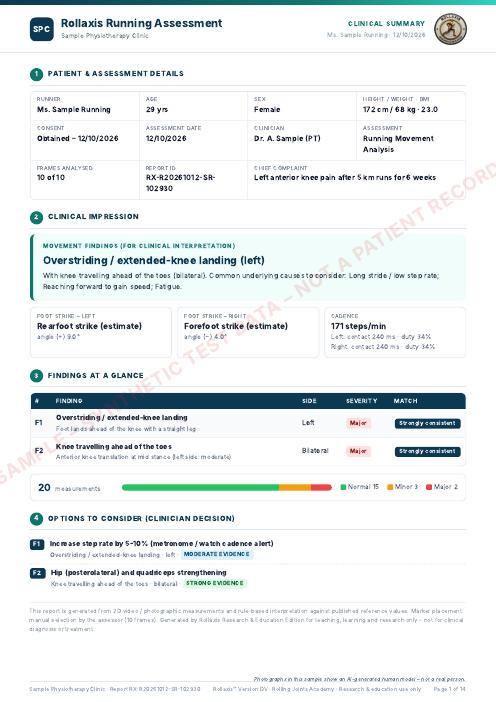
Initial contact, mid stance and push-off. Knee and tibia angle at contact, knee flexion, hip extension, pelvic drop, trunk side-bend, rear foot, foot strike and cadence.
Squat
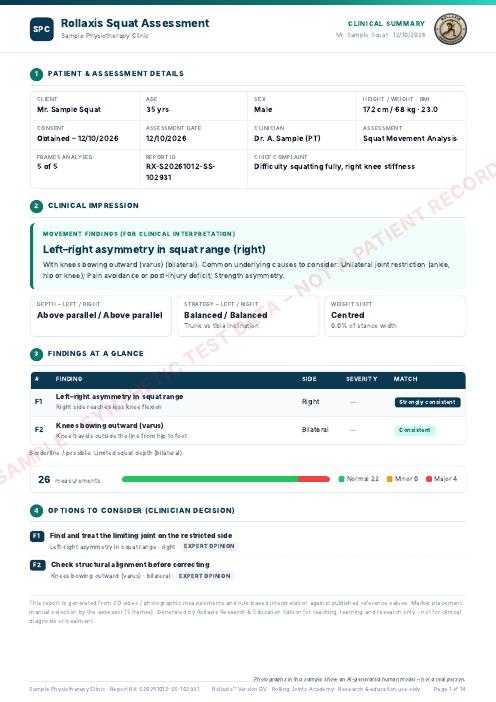
Bottom-of-squat knee and hip flexion, ankle dorsiflexion, depth, trunk lean, trunk–tibia angle, heel lift, FPPA, knee–ankle ratio, pelvic tilt and hip shift.
Posture
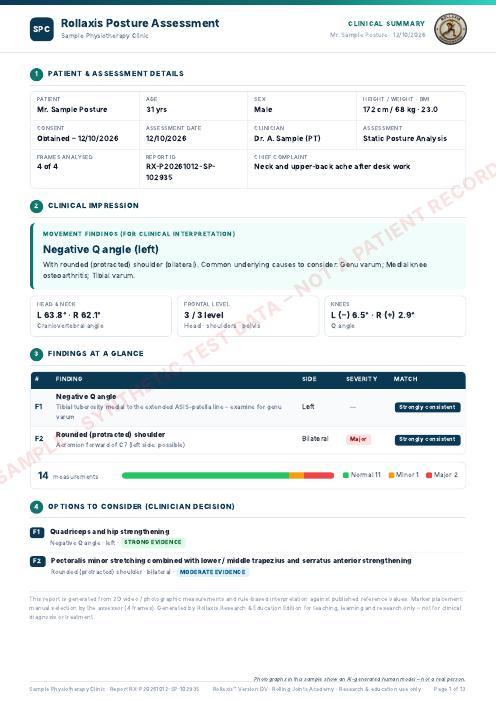
Anterior, posterior and both lateral photographs. Head, shoulder and pelvic levels, craniovertebral and shoulder angles, Q angle, rear foot, genu recurvatum.
Landing (LESS)
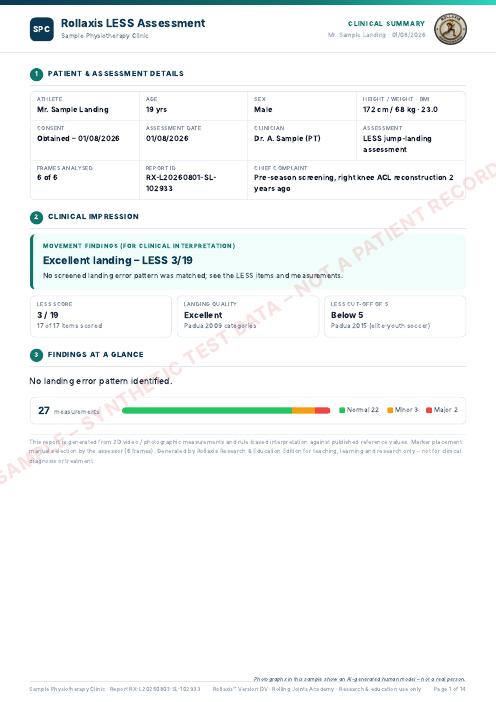
Jump-landing from a 30 cm box (Padua et al., 2009). Initial contact and maximum knee flexion, front and side; the LESS items scored, with the published cut-off flagged.
Compare
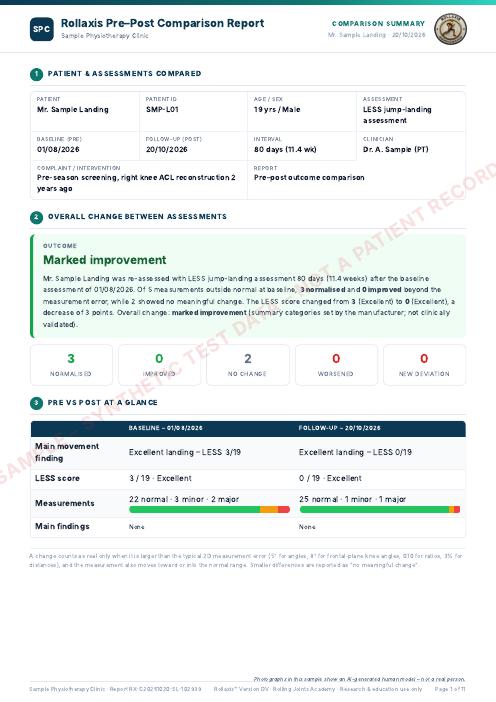
Tick two saved assessments of the same person and analysis to generate a before–after comparison report.
Left to right, in seven steps
Demographics
Participant details, chief complaint and time-stamped informed consent.
Analysis & record
Choose the analysis; the cameras open with recommended settings.
Videos & markers
Capture the required frames and place or auto-mark landmarks.
Reference values
Published normal ranges with sources, editable, with reset to defaults.
Compare
Pre–post comparison of saved assessments.
Reports
Review, save as PDF and copy the summary text.
Help
Step-by-step manual and instruction sheets for every analysis.
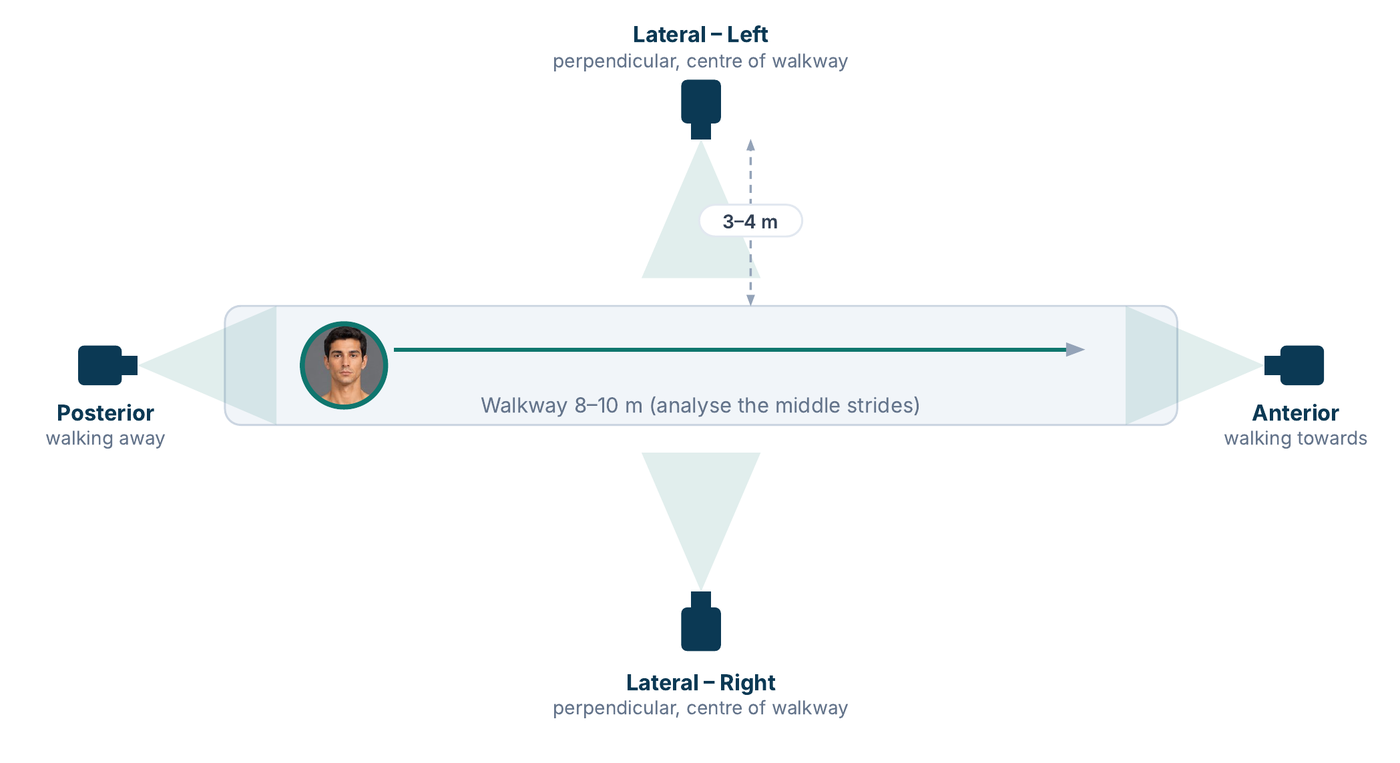
Any room becomes a movement lab
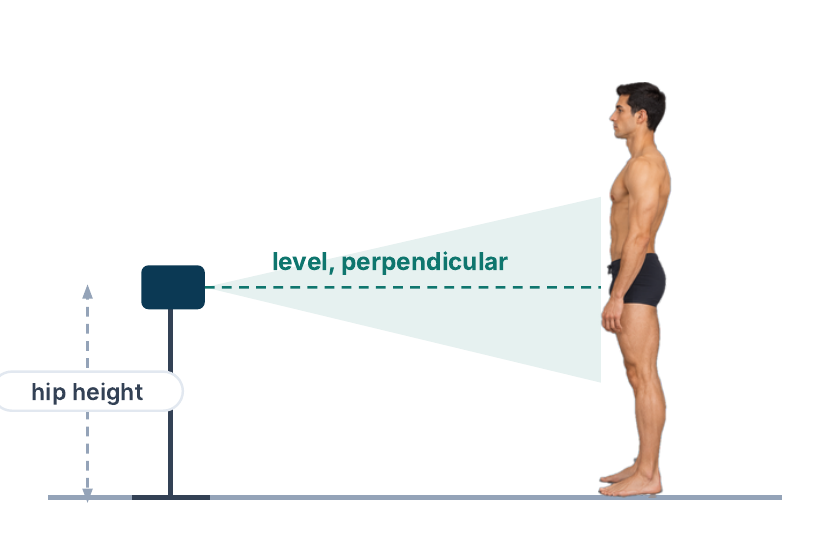
Two cameras at the sides, 3–4 m from an 8–10 m walkway, plus one behind and one in front, all at hip height.
Full teaching reports
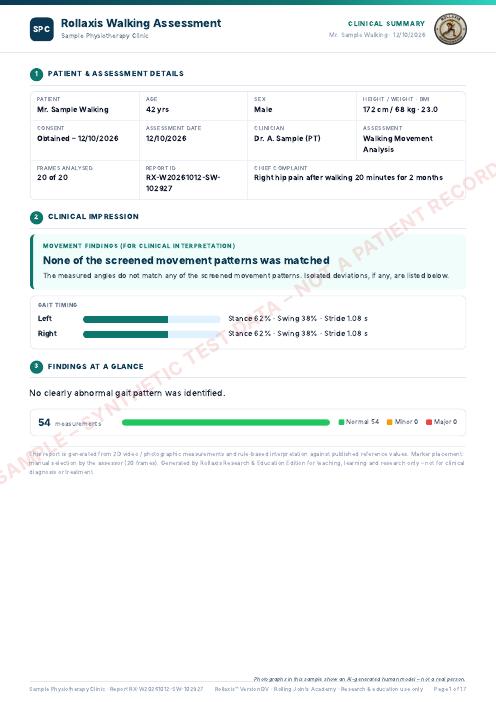
- Clinical summary: participant, complaint, consent, movement findings
- Results tables and charts; posture body model with plumb lines
- Interpretation, provisional diagnosis and management options with evidence labels (teaching examples)
- Images, method and references appendix
- Clinician sign-off and declarations page
- Every page marked “research & education use only”
Reference values with sources
| Analysis | Default sources |
|---|---|
| Walking | Rancho Los Amigos; Perry & Burnfield 2010 |
| Running | Souza 2016; Novacheck 1998 |
| Squat | Healthy-adult squat values; Munro 2012 (FPPA) |
| Posture | CVA ≥ 50°; Q angle (Horton & Hall 1989) |
| Landing | Padua et al. 2009 (LESS) |
Every reference value can be edited by the user and reset to the defaults.
Software and equipment, ready to use
Every package includes 500 marker stickers, the user manual, instruction sheets, sample reports, email support and software updates.
01Rollaxis Essential
- 2 cameras
- 2 tripod stands
- 500 marker stickers
02Rollaxis Run
- 4 cameras
- 4 tripod stands
- 500 marker stickers
03Rollaxis Sport
- 4 cameras
- 4 tripod stands
- 500 marker stickers
04Rollaxis Complete
- 4 cameras
- 4 tripod stands
- 30 cm landing box
- 2 rolls of marking tape
- 500 marker stickers
Frequently asked questions
Is Rollaxis a medical device?
No. Rollaxis is research and education software. It is not a medical device.
What computer do I need?
A Windows laptop. Rollaxis works offline; the internet is needed only once, during installation and activation.
What cameras can we use?
Ordinary cameras or phone cameras on tripods at hip height. Packages include cameras and tripod stands, and the instruction sheets show the exact positions.
Can we move Rollaxis to a new laptop?
Yes. Each copy runs on one laptop. If a laptop is replaced, contact us and we will help you move it.
How is the landing assessment scored?
Item by item, based on the Landing Error Scoring System described by Padua et al. (2009). Some items are estimated from 2D video, and the report shows which ones.
Do you train our faculty?
Yes. We set Rollaxis up at your institution or online, and train faculty to record, mark and read reports.
See Rollaxis in your own lab
We visit your institution or present online, set Rollaxis up and train your faculty.